 Oufle

★Getting started
- Start Oufle. The launcher shows whether Genshin Impact is running.
- Start the game (or switch back to it). Oufle follows it: there is nothing to set up.
- Look at the bottom centre of the game. On screens where a feature helps, a button with the Oufle mark appears there. Buttons with the mark are Oufle's; everything else is the game's.
- Click an Oufle button to open its panel, and click it again (or ×) to close it.
⌂The launcher
One resizable window: Home with the game status and your account, a page for each feature, the Guide and Feedback.
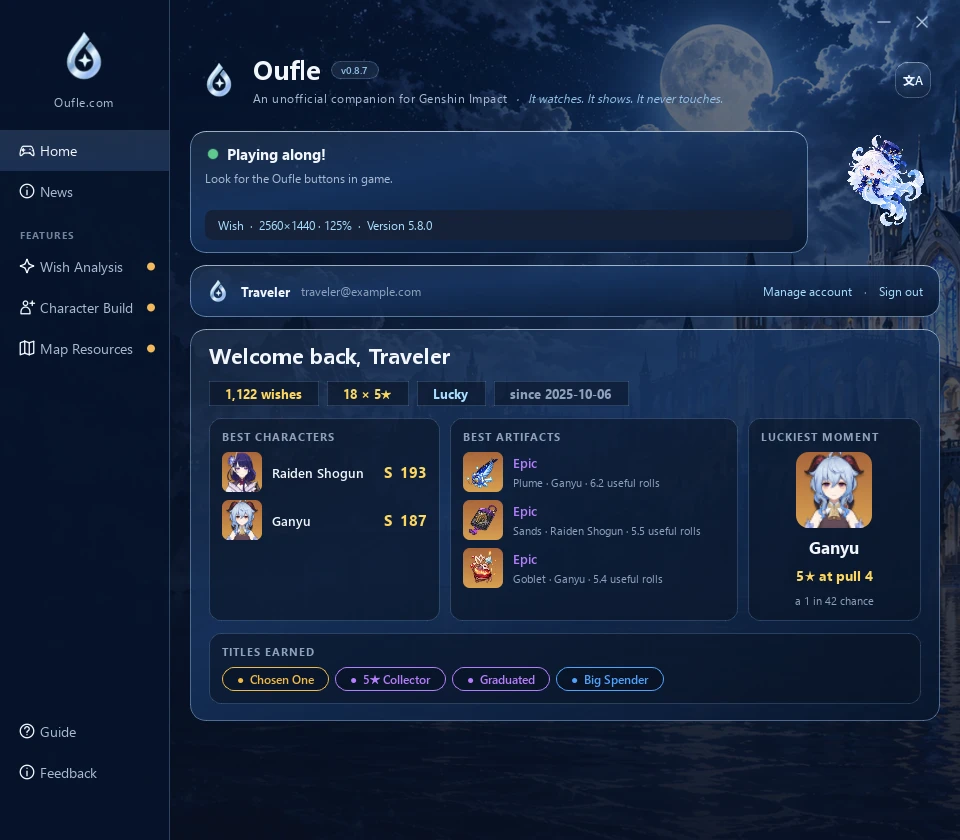
Game status
| Light | Meaning |
|---|---|
| Grey | Genshin isn't running. |
| Yellow | Genshin is running but in the background or minimised; in-game buttons are hidden. |
| Green | Genshin is in front: Oufle is ready. |
While Genshin is running, a line below the light shows the current game screen, resolution and display scale, game version, and your UID once a feature has read it.
Your adventure so far
Under the game status, Oufle keeps a few numbers for you: how many wishes you have made and how many 5★ they brought, your overall luck and luckiest pull, your best-scoring showcase character, and the titles you have earned. It fills in as you use the features; nothing is uploaded for it. Signed in, your account sits below it on one line, with links to manage it on oufle.com or sign out.
Feature pages
Each feature in the sidebar has its own page with the same panel the game shows: your wish history with every tab, any character from your showcase, and the resource filter. Sync, Share and picking resources there do exactly what they do in game. Until a feature has something to show, its page lists the few steps to get there. How it works at the top right opens this guide at that feature.
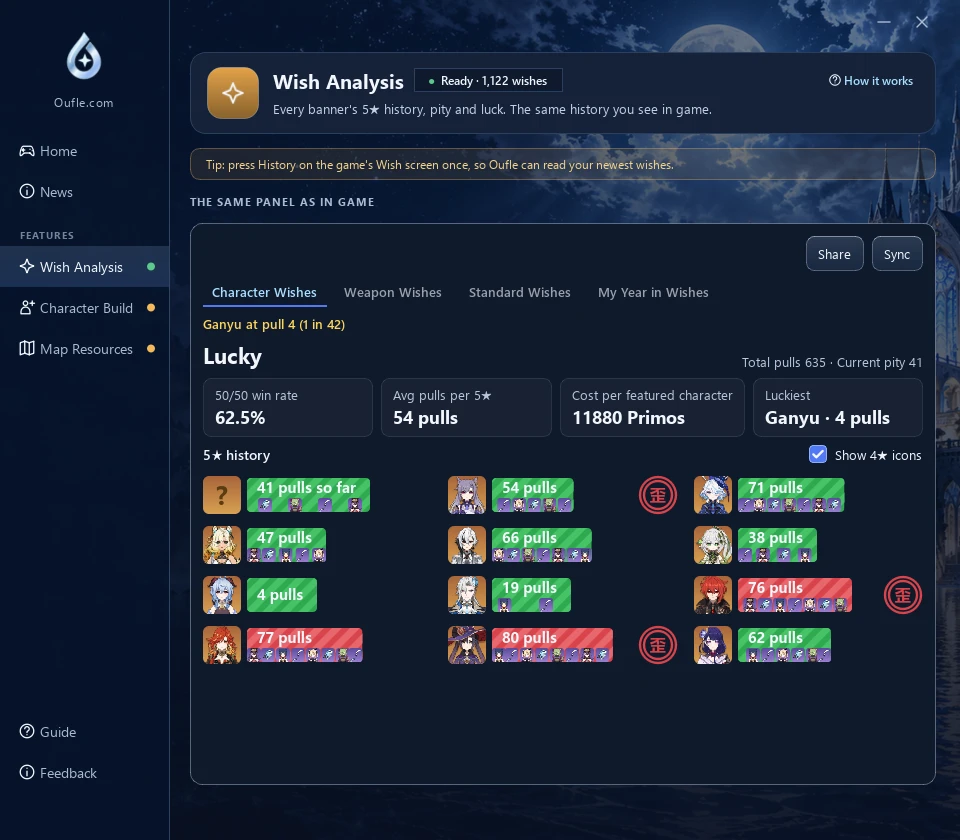
A dot beside each feature tells its state: green has something to show, yellow is waiting for data from the game. Every feature starts by itself; there are no switches. Artifact rating works in game only and needs a free Oufle account. Everything else works without one.
Language
The 文A button at the top: System, English or 中文. The panels in the game switch too.
Closing Oufle
Closing the window with × quits; – keeps Oufle running in the tray.
When an update has been downloaded, a bar at the bottom of the launcher offers to restart into the new version.
◎Account & feedback
An Oufle account is optional. It unlocks artifact rating and lets you back up wishes and builds.
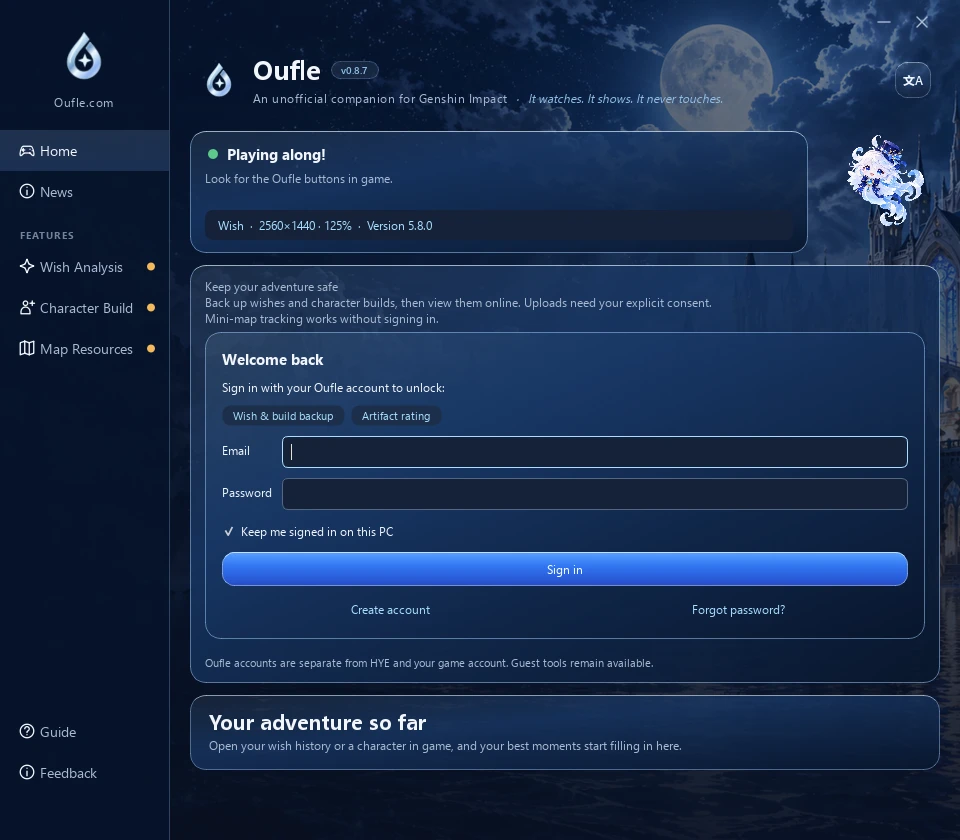
- In the Home account card, enter your Oufle email and password and click Sign in. Create account and Forgot password? open oufle.com.
- Keep me signed in on this PC remembers your session in Windows-protected storage; your password is never saved. The session is checked when Oufle starts and every five minutes.
- Signing in never uploads anything by itself. Wish history and builds are saved online only when you tick the consent box in their panel and choose to save.
- Oufle, HYE and HoYoverse accounts are separate. Signed in, the Home account card shows who you are, links to Manage account and devices on oufle.com and has Sign out.
Feedback
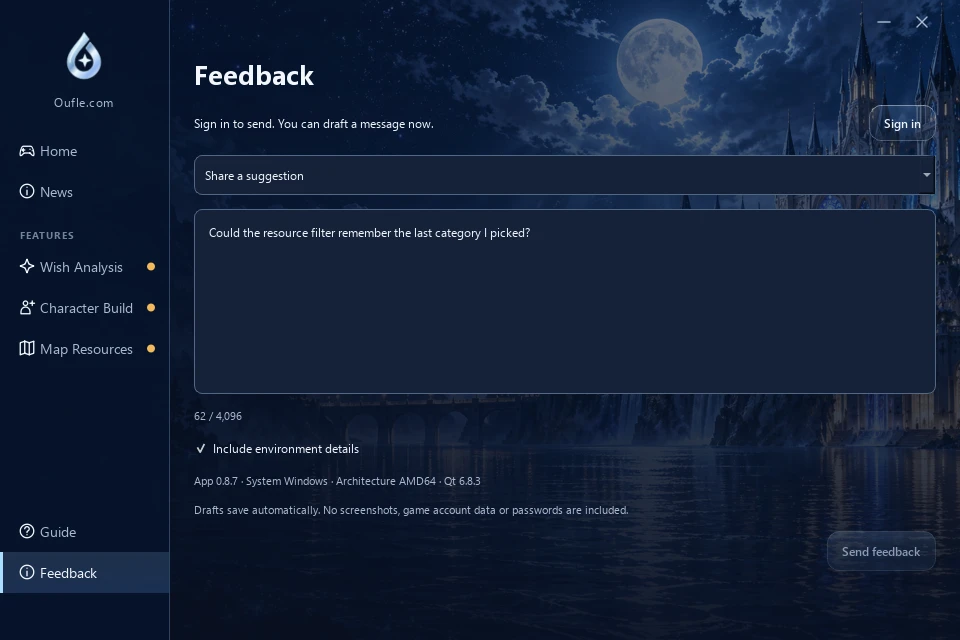
Report a problem or share an idea. Your draft is kept while you switch pages, and reports are queued and sent when you are online. Sending needs an Oufle account. Include environment details adds the app version, Windows and Qt versions shown under the box; no screenshots, game data or passwords are ever included.
✦Wish analysis
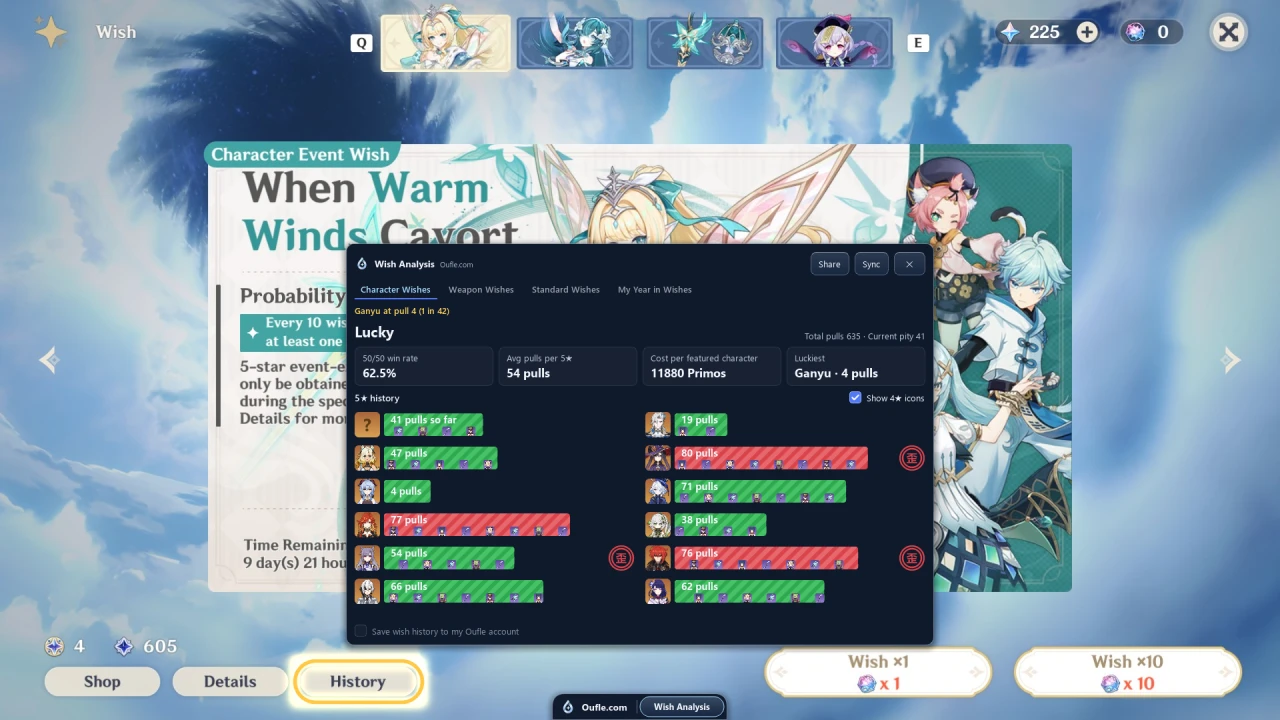
Every banner's 5★ history, pity and luck, right on the wish screen.
First time
- In the game, open Wish → History once. The game keeps a short-lived link to your history; Oufle uses it.
- Open the panel and press Sync. The first sync reads the last year of wishes, about a minute.
After that the panel syncs quietly on its own when you visit the wish screens (at most every ten minutes) and whenever you reopen it. The game itself lists a wish about an hour after you make it, so a brand-new 5★ shows up on a later visit.
Tabs
The panel opens on the banner the game shows. The two character event banners share one history (and one pity), so the tabs are Character Wishes, Weapon Wishes and Standard Wishes, plus My Year in Wishes. Chronicled wishes are counted when you have them.
What you see
- Your overall luck, and a luck title per banner from Blessed to Cursed.
- 50/50 win rate, average pulls per 5★, the cost per featured character or weapon, and your luckiest pull.
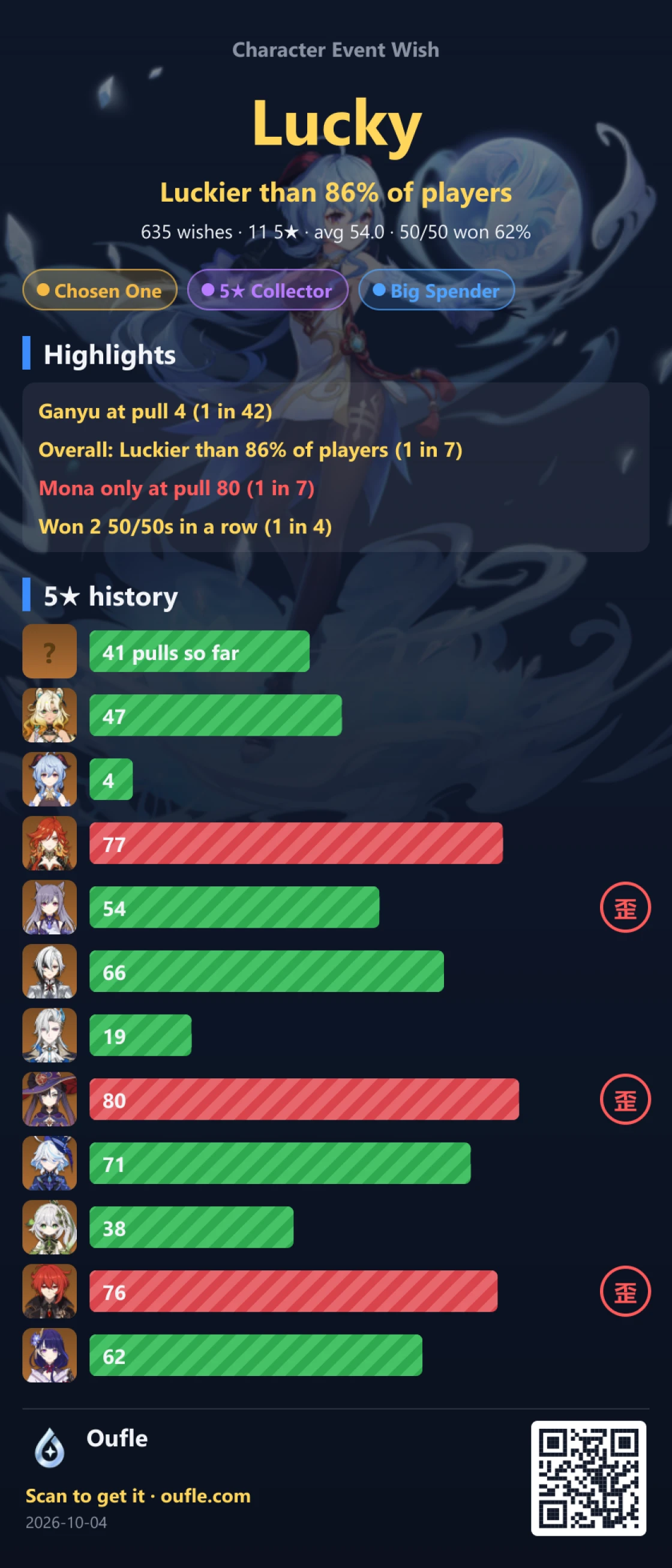
- Every 5★ with its pity as a bar: short and green is lucky, long and red is hard pity. The 歪 mark is a lost 50/50. Show 4★ icons adds the 4★ pulled along the way.
- Your current pity on each banner, at the top of the list.
Luck uses the game's real odds: 0.6% base rate, soft pity from pull 74 and a guaranteed 5★ by pull 90 (weapons: 0.7%, from 63, by 80).
My Year in Wishes and sharing
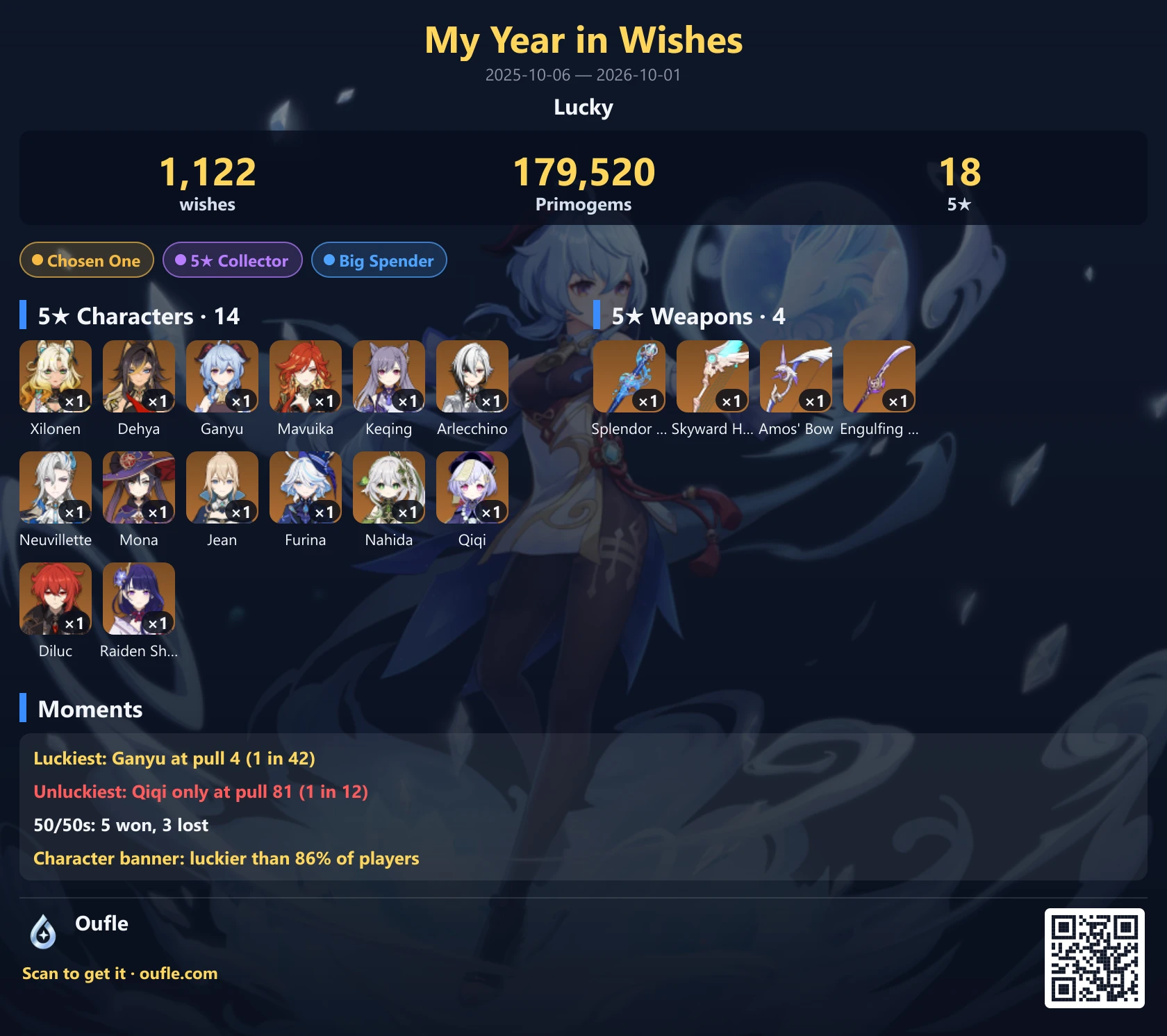
My Year in Wishes puts the characters and weapons from every banner of the last year on one card, right in the game. Share saves whatever tab you're on as a picture and copies it.
Saving online (optional)
Signed in, tick Save wish history to my Oufle account at the bottom of the panel. History saves online after each sync, and the time of the last save shows next to the box. Without the tick, history stays on this PC only.
♛Character build
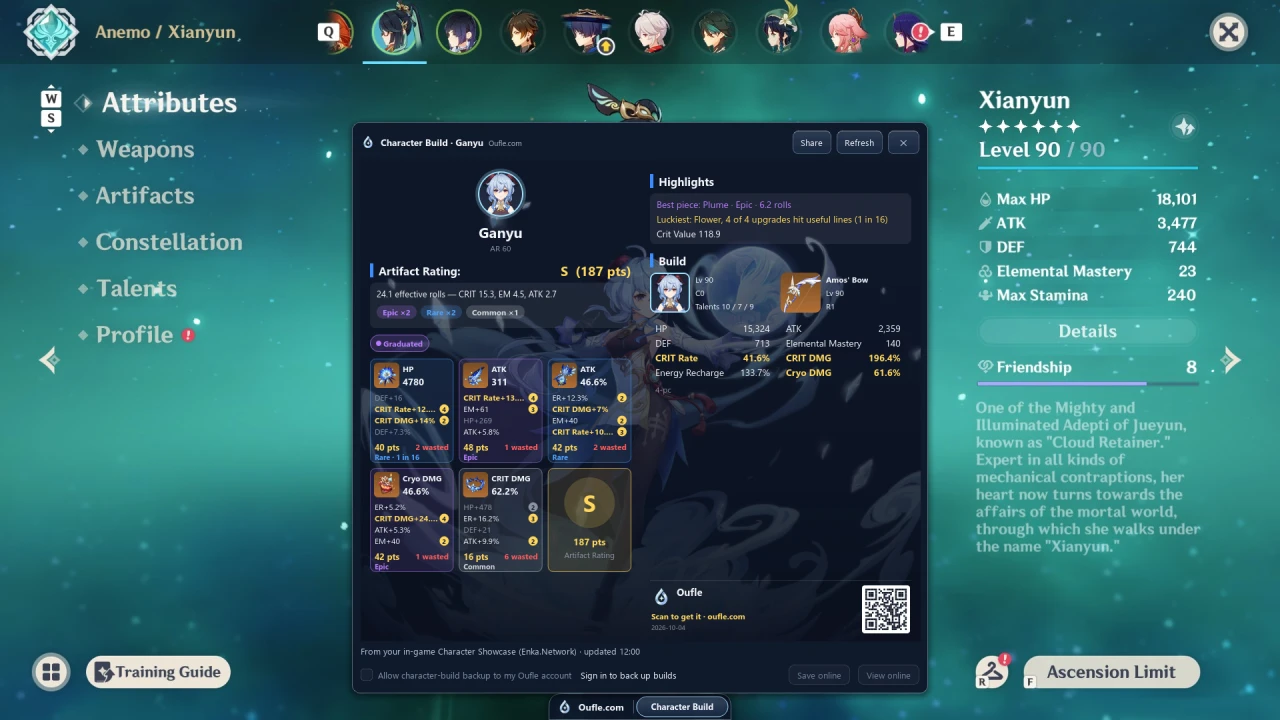
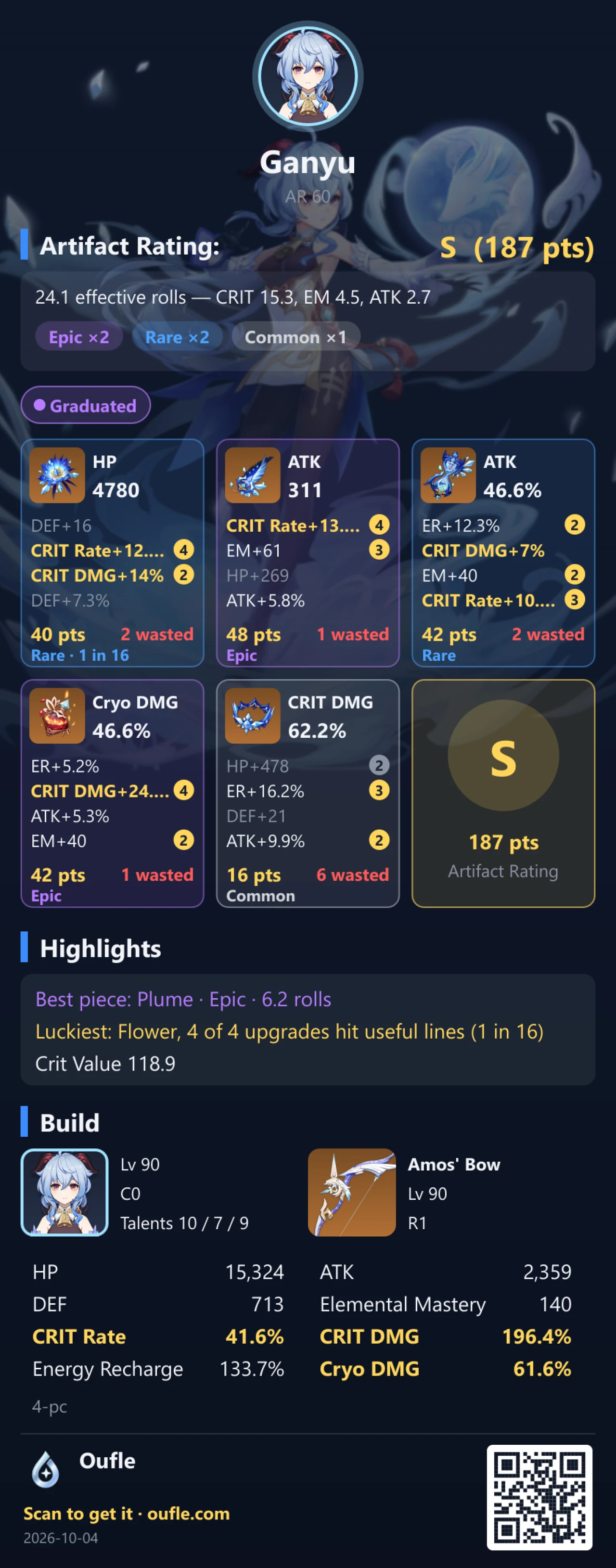
Artifact scores, crit value and a build grade for the character on screen.
- Put the character in your Character Showcase (Paimon menu → Edit Profile → Character Showcase) and turn on Show Character Details.
- Open the character screen and press the Oufle button. Oufle reads your UID from the bottom-right corner and fetches your showcase from Enka.Network.
The panel shows each artifact with its score, effective rolls and rarity colour, the character's total stats, talents, weapon and a build grade, with highlights such as the best piece. When a build improves, the card remembers the previous grade and shows the before and after.
The showcase updates a few minutes after you change it in the game; Refresh fetches it again when it's due. To back up builds, tick Allow character-build backup to my Oufle account and press Save online; View online opens My Builds on oufle.com.
❀Artifact rating
A score card next to the artifact you're looking at.
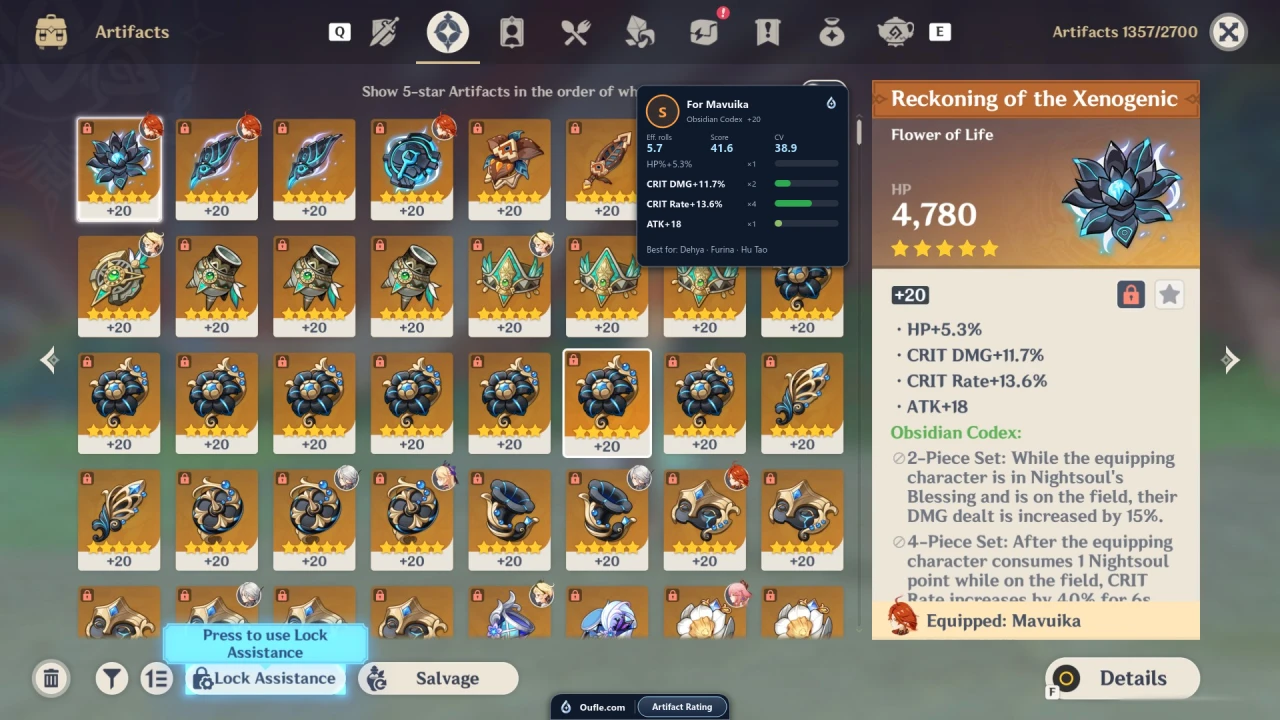
The card rates the artifact for the character wearing it (or the one you're viewing), with its score, rolls, crit value and rarity, and lists the characters it suits best. It turns on by itself once you sign in to Oufle; the in-game Artifact Rating button pauses and resumes it.
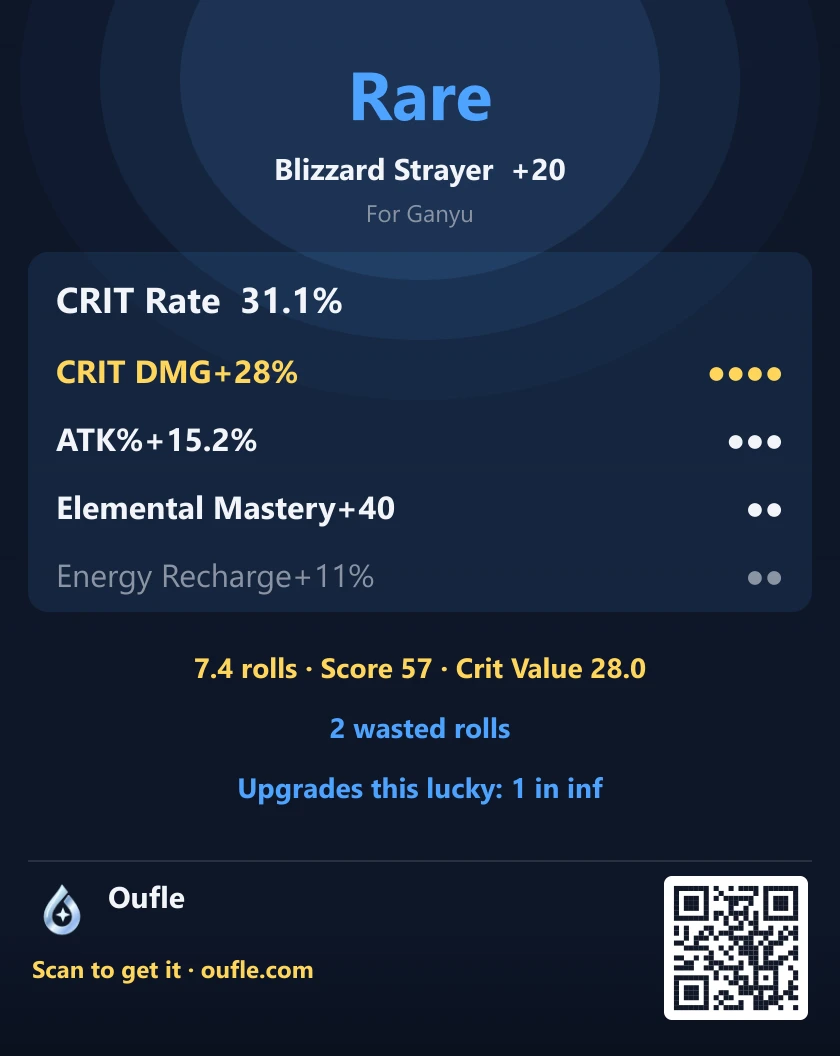
Find a Legendary or Mythic piece and Oufle offers to share it as a loot drop:
⌖Map resources
Pins for the resource you pick, on the big map and the mini-map.
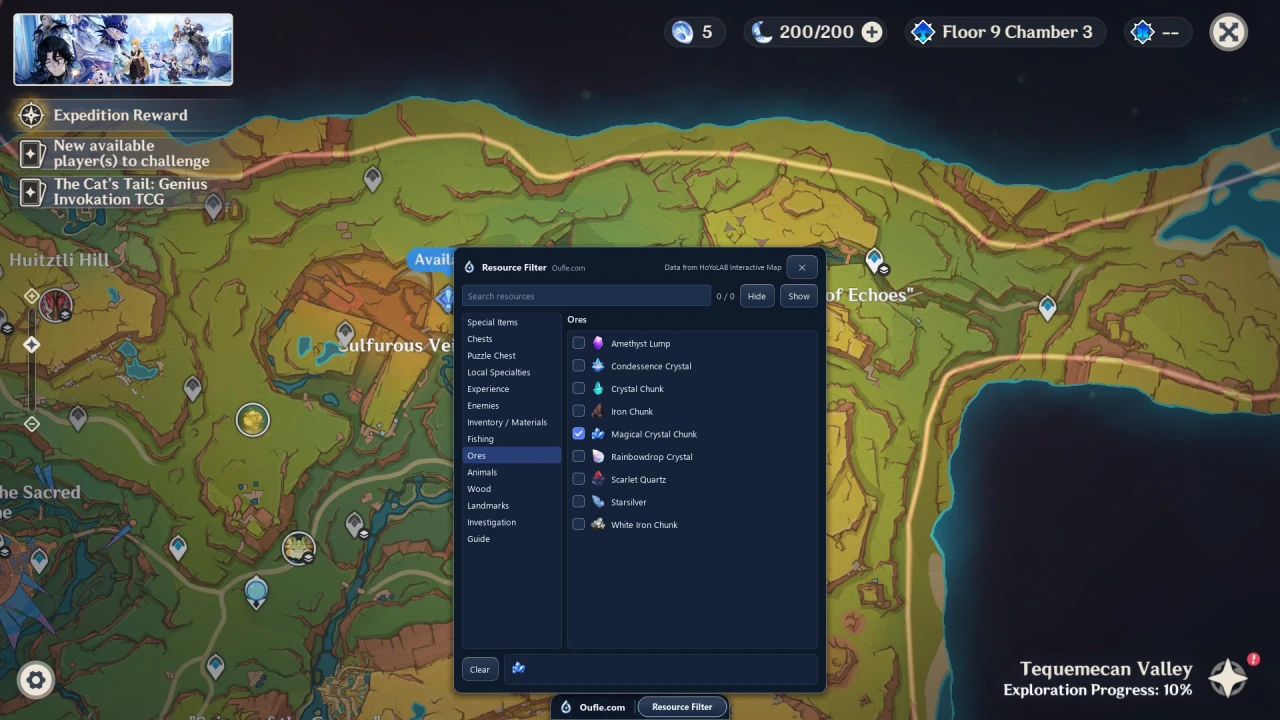
- Pick a category on the left and tick a resource on the right. Oufle tracks one resource at a time; ticking another one switches to it. Search works in English and Chinese.
- Oufle recognises which map and which floor you are looking at, including underground layers, by itself.
- Hide hides all pins for a moment and Show brings them back; your picks stay. The strip at the bottom shows your pick; click its icon or Clear to remove it.
- Mini-map tracking needs no sign-in: pins follow the mini-map while you explore.
✉Sharing & toasts
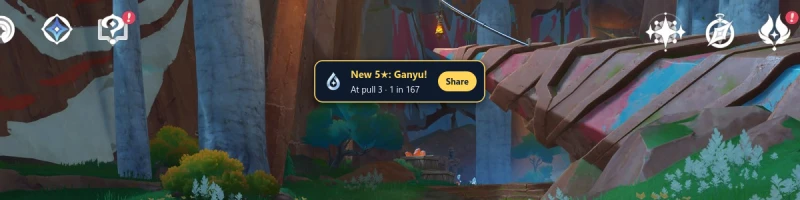
Oufle lets you know about a new 5★ (with its real odds), a newly earned achievement, an improved build or a Legendary artifact. Click the toast to share, or ignore it: it fades by itself.
Every share is saved as a sharp picture in Pictures\Oufle and copied to the clipboard, so you can paste it straight into a chat. Cards hide most of your UID.
◆Artifact rarity
Loot colours, like an action RPG. They count wasted rolls: rolls that went into a stat the character barely uses.
| Tier | Rule |
|---|---|
| Mythic | Every roll useful, fully levelled, and 7 or more effective rolls. |
| Legendary | Every roll useful. |
| Epic | 1 wasted roll. |
| Rare | 2 wasted rolls. |
| Magic | 3–4 wasted rolls. |
| Common | 5 or more wasted rolls. |
"1 in N" on a card is how unlikely it was for this many upgrades to land on useful lines, since each upgrade picks one of the four lines at random.
▲Build grades
The sum of the five artifact scores, weighted for the character.
| Grade | SSS | SS | S+ | S | A+ | A | B | C |
|---|---|---|---|---|---|---|---|---|
| Score from | 260 | 235 | 210 | 185 | 145 | 120 | 95 | 0 |
♚Achievements
Titles you earn from your wishes and builds. Bad luck earns titles too: misery loves company.
From wishes
| Title | How |
|---|---|
| Chosen One | A 5★ within 10 pulls (Mythic within 3). |
| Early Gold | A 5★ within 30 pulls. |
| Hard Pity Club | A 5★ only at pull 85+ (weapons 75+). |
| Coin-Flip King | 3 or more 50/50s won in a row. |
| Professional Loser | 3 or more 50/50s lost in a row. |
| Certified Lucky / Unlucky | Luckier (or unluckier) than 95% of players on the character banner. |
| 5★ Collector | 10 or more 5★ in a year. |
| Big Spender | 500 or more wishes in a year. |
From builds
| Title | How |
|---|---|
| Mythic Find / Flawless | A Mythic or a Legendary artifact. |
| Matching Set | All five artifacts Epic or better. |
| Crit Master | One artifact with crit value 45 or more. |
| Golden Ratio | 70% crit rate and 140% crit damage. |
| Upgrade Luck | Upgrades that lucky happen 1 time in 32 or rarer. |
| Graduated / Endgame Build | Grade S or better / SS or better. |
✓Privacy & safety
Oufle only watches and shows. It looks at the game screen like a screenshot and shows its tips in its own transparent window on top. It never changes the game, never reads its memory, and never presses keys or clicks for you.
- Everything with the Oufle mark is Oufle's: the buttons, panels and pins are a separate layer over the game, not part of it. They never appear in your game screenshots or recordings.
- Besides the screen, Oufle reads one thing: the wish-history link the game saves when you open Wish → History, as every wish tracker does. The link stays in memory on your PC and is only sent to HoYoverse's own server to read your history.
- Your UID is only sent to Enka.Network, for character builds.
- Your wish history, achievements and build history are saved on your PC, in %APPDATA%\gamehelper. Wish history uses the standard UIGF format, so other tools can read it. Nothing goes to your Oufle account unless you tick its consent box in the wish or build panel.
- Oufle is a fan-made tool, not affiliated with or endorsed by HoYoverse, and HoYoverse has not authorised it. No bans for tools that only watch the screen are known, but the game's terms do not allow third-party software, so use it at your own risk.
?FAQ
Does it work in full screen?
Yes. Oufle buttons, panels, map pins and share toasts all work in full screen, and clicking them doesn't take you out of the game. The one exception is typing in the Resource Filter's search box: in full screen the game minimises itself when another window takes the keyboard, so the box won't accept typing and says Search works in Windowed mode. Pick a resource by clicking the categories instead, or switch to windowed mode (Alt+Enter, or Settings → Graphics → Display Mode) to search.
I don't see any Oufle buttons.
Buttons only appear on screens where a feature helps (wish, character, artifacts, map) and only while the game is in front. Check that the launcher's light is green.
Sync says it can't find my wish history.
Open Wish → History in the game once, then sync again. The game's link expires after a day.
Character build says my showcase is empty or private.
Add the character to your Character Showcase and turn on Show Character Details, then wait a few minutes for it to update.
The panel covers something I need.
Click its Oufle button again, or × in the panel, to close it. Resource picks are kept for next time.
How do I change the language?
Click the 文A button at the top of the launcher and pick System, English or 中文. System uses Chinese on a Chinese Windows and English otherwise. The panels in the game and the pictures in this guide switch too.